the platform

how workforce planner works

Workforce Planner describes your organisation as posts: positions in the structure that exist whether or not anyone is in them. Every change to a post is a dated event, so the structure can be shown for any month, past or planned, and projected forward from there.

posts, not people

The post is the record: a position in the structure, with a place in a unit, a reporting line, a role profile, funding, and a lifecycle. People appear only as postholders, an anonymous record that someone held a post from one month to another, with their contracted WTE and an age band. There are no names, staff numbers, or dates of birth, and competencies are requirements of posts, never facts about people.

Because every change is a dated event (created, approved, filled, vacated, regraded, moved, closed), the structure for any month is rebuilt from those events. That is how the structure view can show the past, today, and the plan, and how every change can be traced and undone.

from today's structure to the future

A forecast starts from the structure as it stands in a month and projects every post forward, month by month, for 1 to 30 years. Each month, planned changes apply, starters join, known leavers go, funding and fixed terms end, staff retire and leave at the rates you set, career pathways and internal moves fill vacancies, and recruitment fills what is left after the time to hire. One internal move leaves a vacancy behind it, so the forecast follows the chain that redesign plans often miss.

An option is a possible future for a forecast: a set of planned changes and changed assumptions. Options never change the structure itself until you choose to adopt one into your plan, so you can test as many as you like and compare them on posts, WTE, vacancies, need, cost, and service impact.

The same tool serves a ward skill-mix review of 50 to 100 posts, a directorate review of posts, structure, and funding, and a 10 to 15 year plan for a whole hospital of up to 20,000 posts. Large forecasts run in the background and identical posts are projected once, so a 10-year forecast of 20,000 posts takes about 20 seconds.

built for the people who plan

  • Plain words. "Post" for the position and "postholder" for the person, so the two are never confused. Each organisation can set its own terms, such as FTE for WTE, or ward for team.
  • What you see, you can edit. Click any editable value to change it where it is shown; lists always offer their options; Enter saves and Escape cancels. Values that cannot be changed never look as if they can.
  • Organisations kept apart. Each organisation's data, forecasts, and people are separate, with roles for viewers, analysts, modellers, and administrators.
  • Secure by default. Two-factor sign-in, required for administrators and available to everyone, and an audit log of every change.
  • Nothing to install. It is a web application, used in the browser.
  • Accessible. Designed to the WCAG 2.1 AA standard. The structure is always available as a list and a table, for screen readers and printing.

hosted in the UK

The platform, its data, and this website are hosted on servers in the UK, in a brand-new data centre in East London, so your workforce data stays in the UK.

Paid licences run on a virtual private server (VPS) in the same UK data centre, with its own reserved computing resources, rather than the shared hosting the free demo uses. Multi-organisation setups get a dedicated server of their own.

  • Hand-picked data centres. Each facility is chosen for fault-tolerant power and cooling and for strong physical security, and must be certified to ISO 27001 for information security and ISO 9001 for quality management.
  • Managed for us. The platform is managed and hosted for Health Dynamics by Western Knowledge Ltd, a UK company.
  • Certified infrastructure. The servers come from a UK infrastructure provider certified to ISO/IEC 27001:2022 and to Cyber Essentials Plus, the UK government-backed scheme.
  • Green and efficient. The data centres run on 100% green energy, and the East London facility has a power usage effectiveness (PUE) of 1.1, so almost all of the power it draws goes to the servers rather than to cooling and overheads.
  • Fast, resilient servers. Enterprise-grade NVMe storage, with regular backup snapshots.
  • A responsible, UK provider. That infrastructure provider is a UK company and a certified B Corporation.

The AI assistant, an add-on to a paid licence, is the one exception: when it is switched on, the anonymous figures and lists it is sent are processed by the AI provider agreed with you, which may be outside the UK. It is switched off in the demo.

the AI assistant

The AI assistant is an optional add-on to a paid licence, and is switched off in the demo. Describe what you want in plain words, such as "a forecast of the medical directorate for ten years" or "an option that replaces a fifth of the Band 5 vacancies with nursing associates", and it drafts the settings: a forecast's scope, assumptions, policies, career pathways, an option's planned changes, staffing standards, or service impact settings. It can also answer questions about a forecast and its options from their figures.

It works within clear limits. Every draft is checked the same way as a setting entered on screen and explained in words, with any problem and the change it would make, for a person to choose from. Nothing is applied by the assistant. It is given the organisation's lists (units, staff groups, grades, profiles, and services) and anonymous figures: nothing names a postholder.

see it in use

capabilities

what it does

Everything below is in the free demo, for up to 50 posts, except the AI assistant, which is an add-on to a paid licence.

posts and structure

  • A unit tree of up to 9 levels, named the way you name them, showing only the levels you use
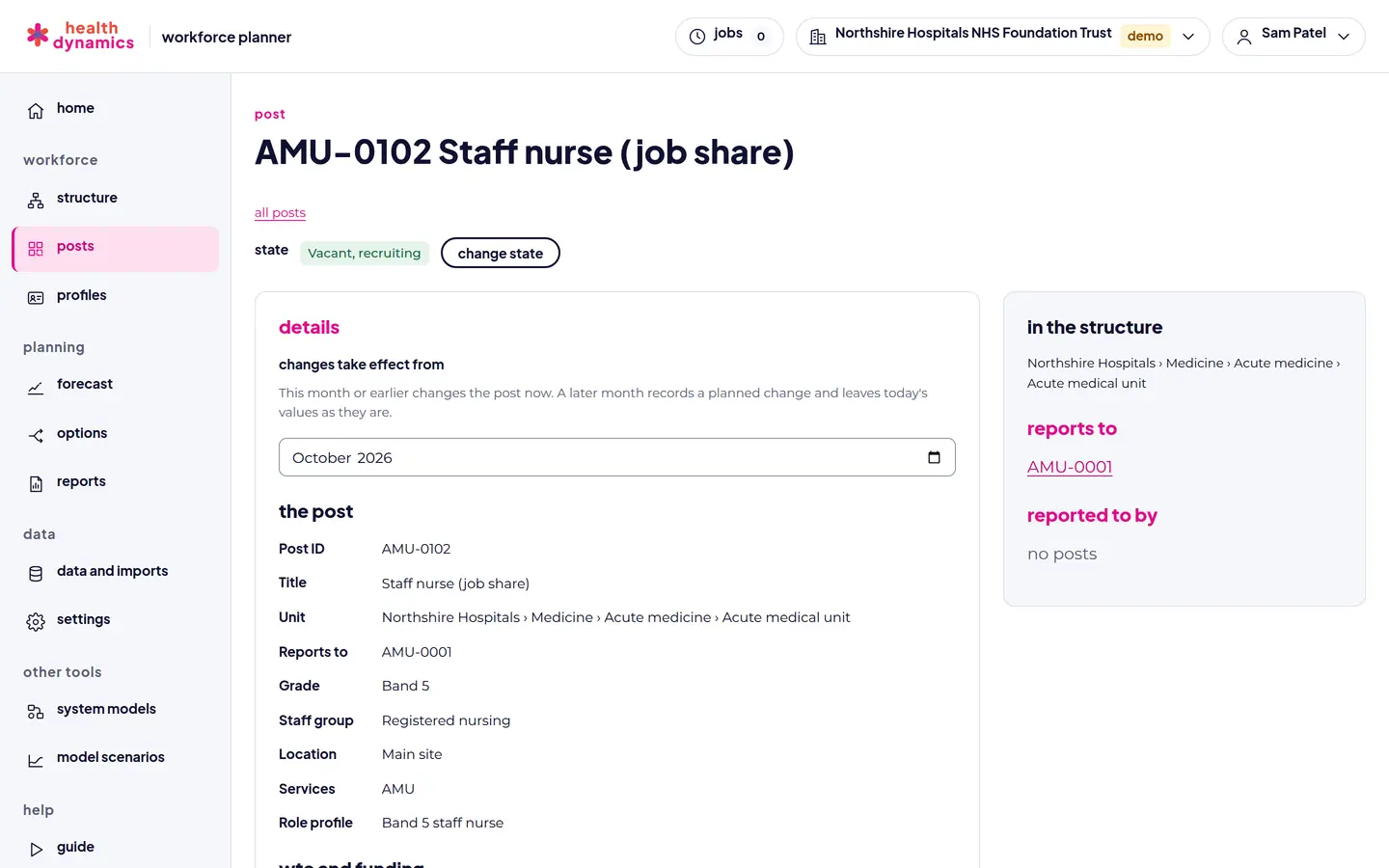
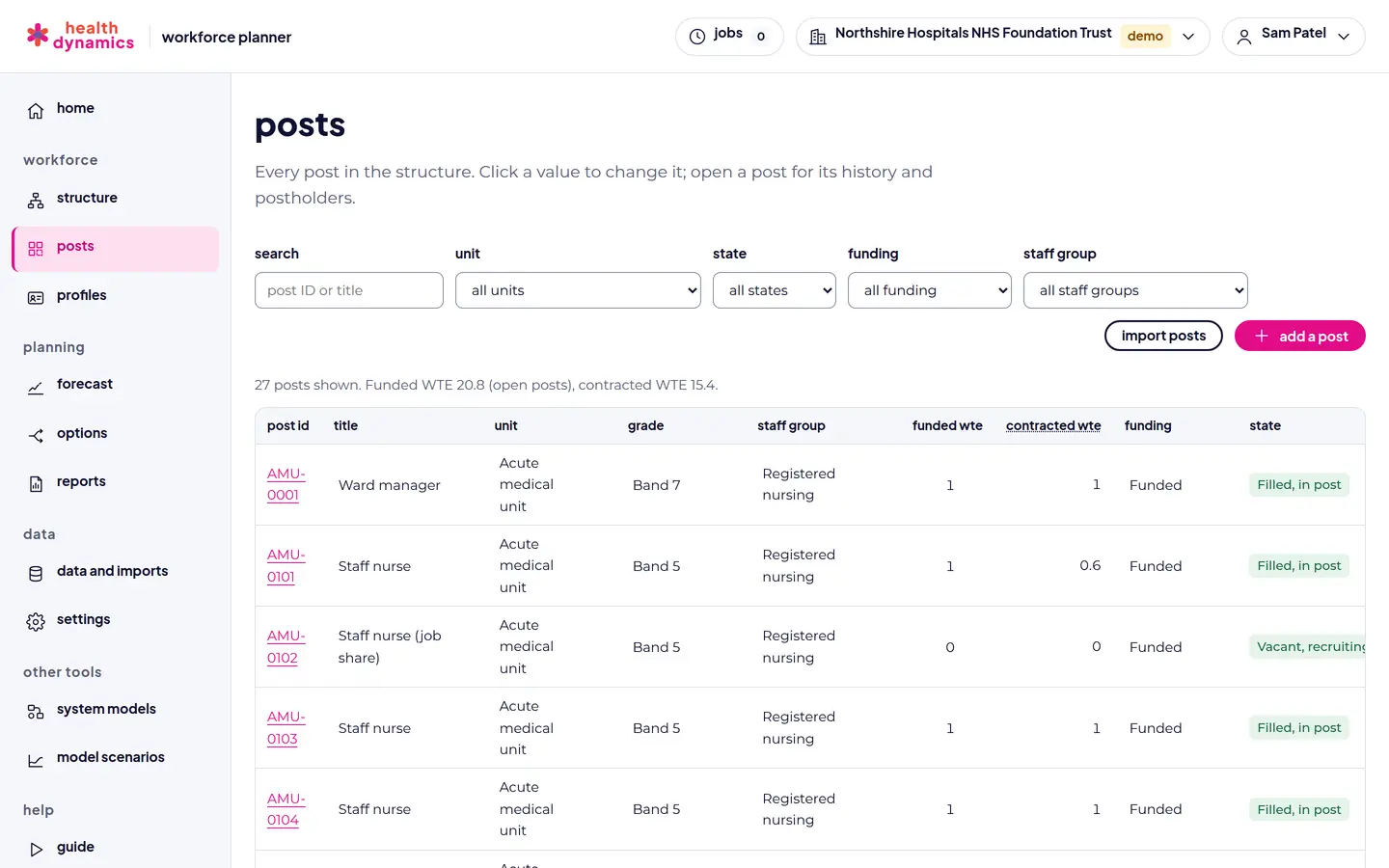
  • Every post with its unit, services, reporting line, grade, staff group, and role profile
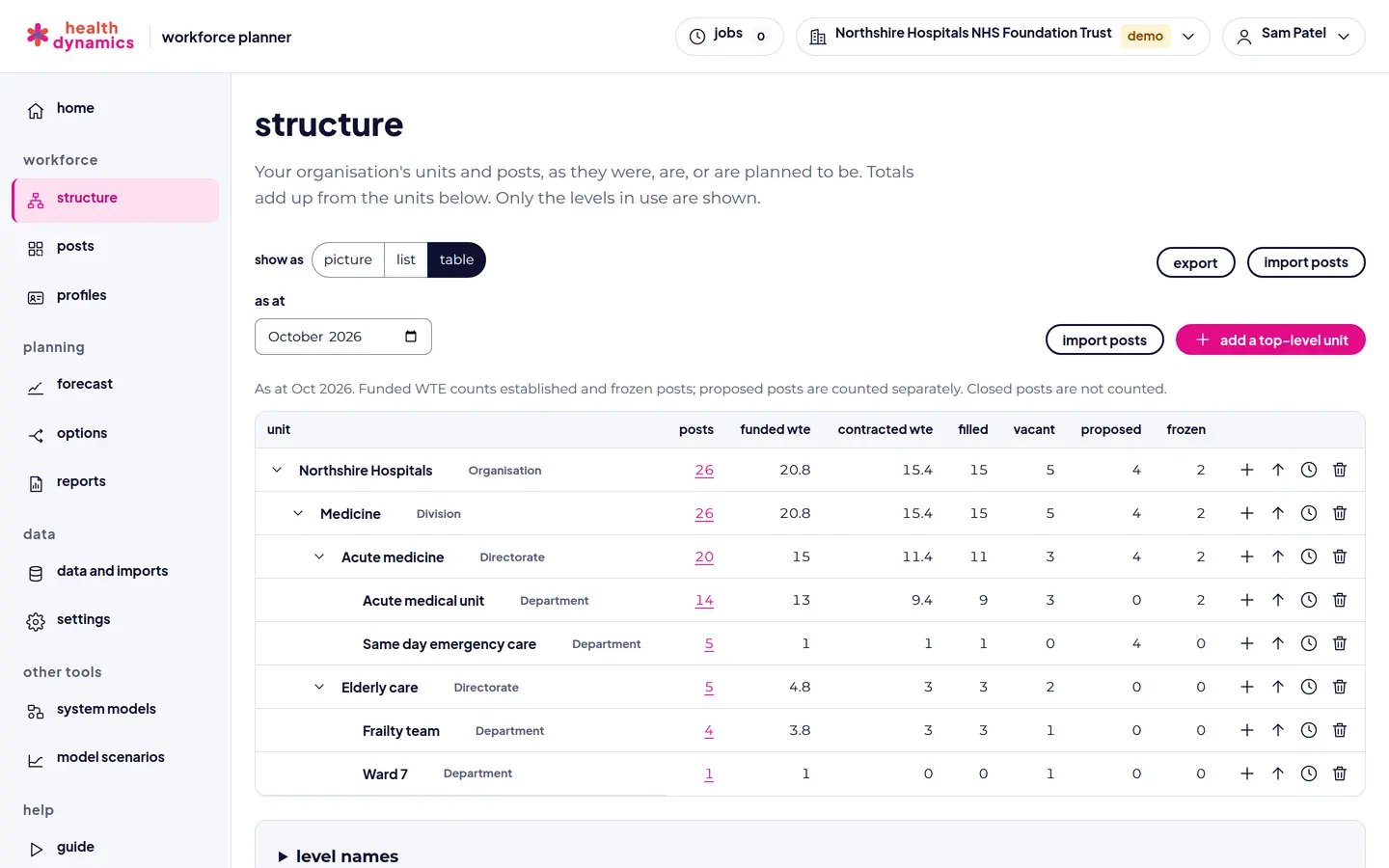
  • Funded and contracted WTE, side by side, with the gap between them
  • Funded, unfunded, externally funded, hosted in, hosted out, and part-funded posts, with funding end dates

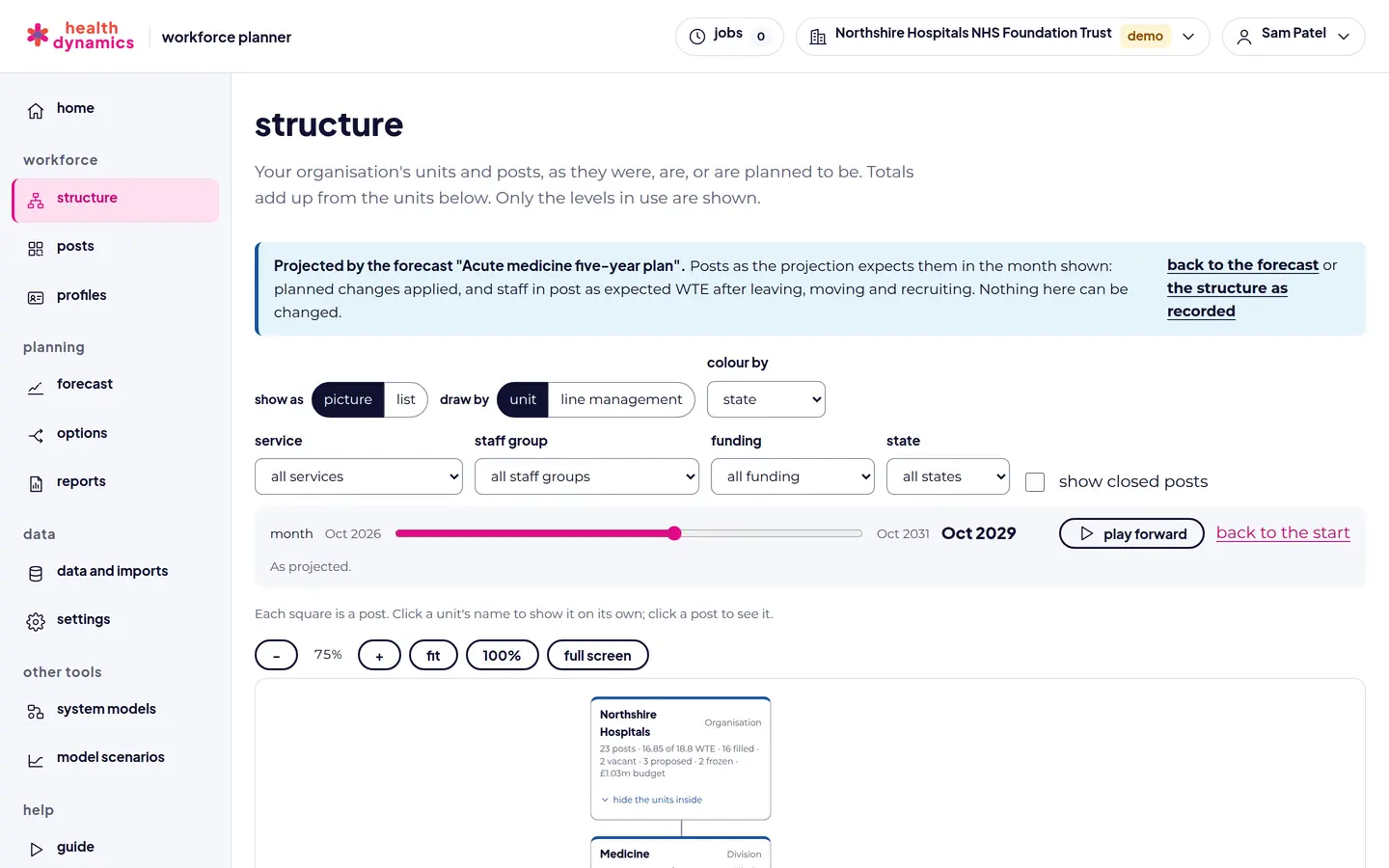
the structure view

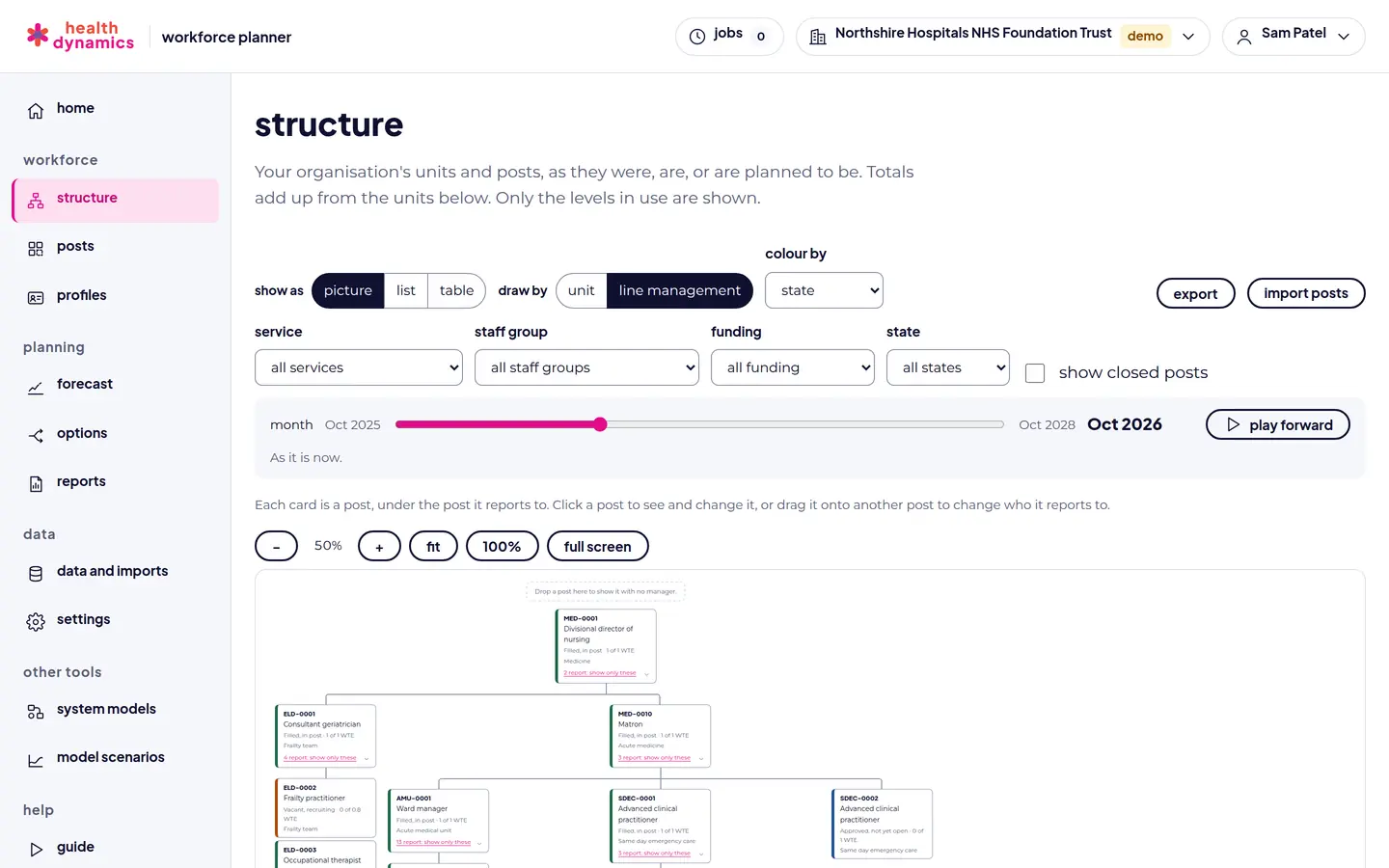
  • An interactive picture of the organisation, by unit or by line management
  • Coloured by state, funding, staff group, grade, or WTE gap, with totals at every level
  • A month slider through the past, today, and the plan
  • Click to edit, drag to move a post, and the same structure as a list and a table

lifecycle and postholders

  • Every post proposed, established, frozen, or closed, with sub-states from recruiting to in post
  • Anonymous postholders: WTE, start month, how they arrived, an age band, and time away with cover, recorded as seconded out or away, never why
  • Every change a dated event, with a history and undo
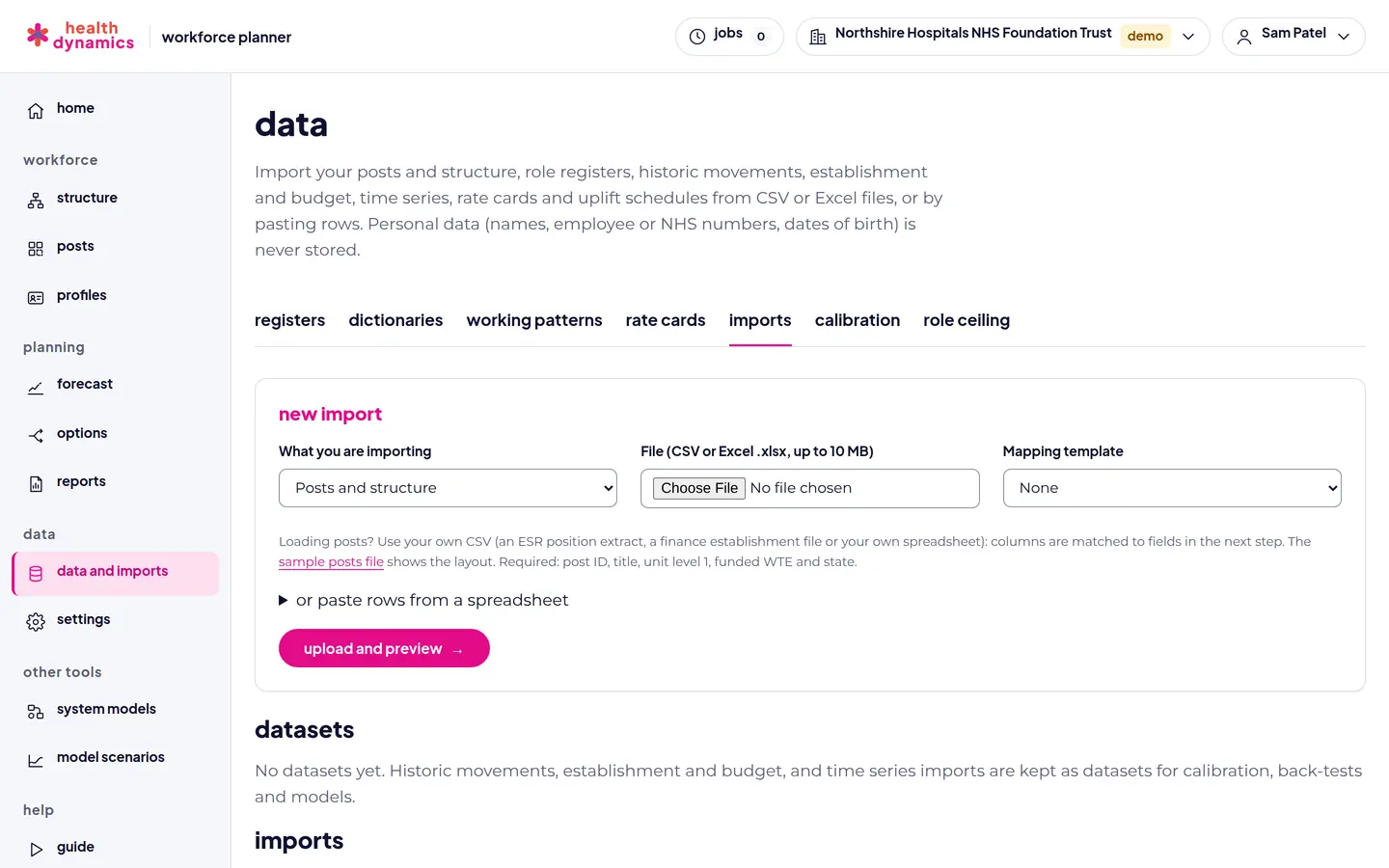
  • Your own file loaded: an ESR position extract, a finance file, or your own spreadsheet

role profiles and competencies

  • A competency library, with an NHS starter list to adapt
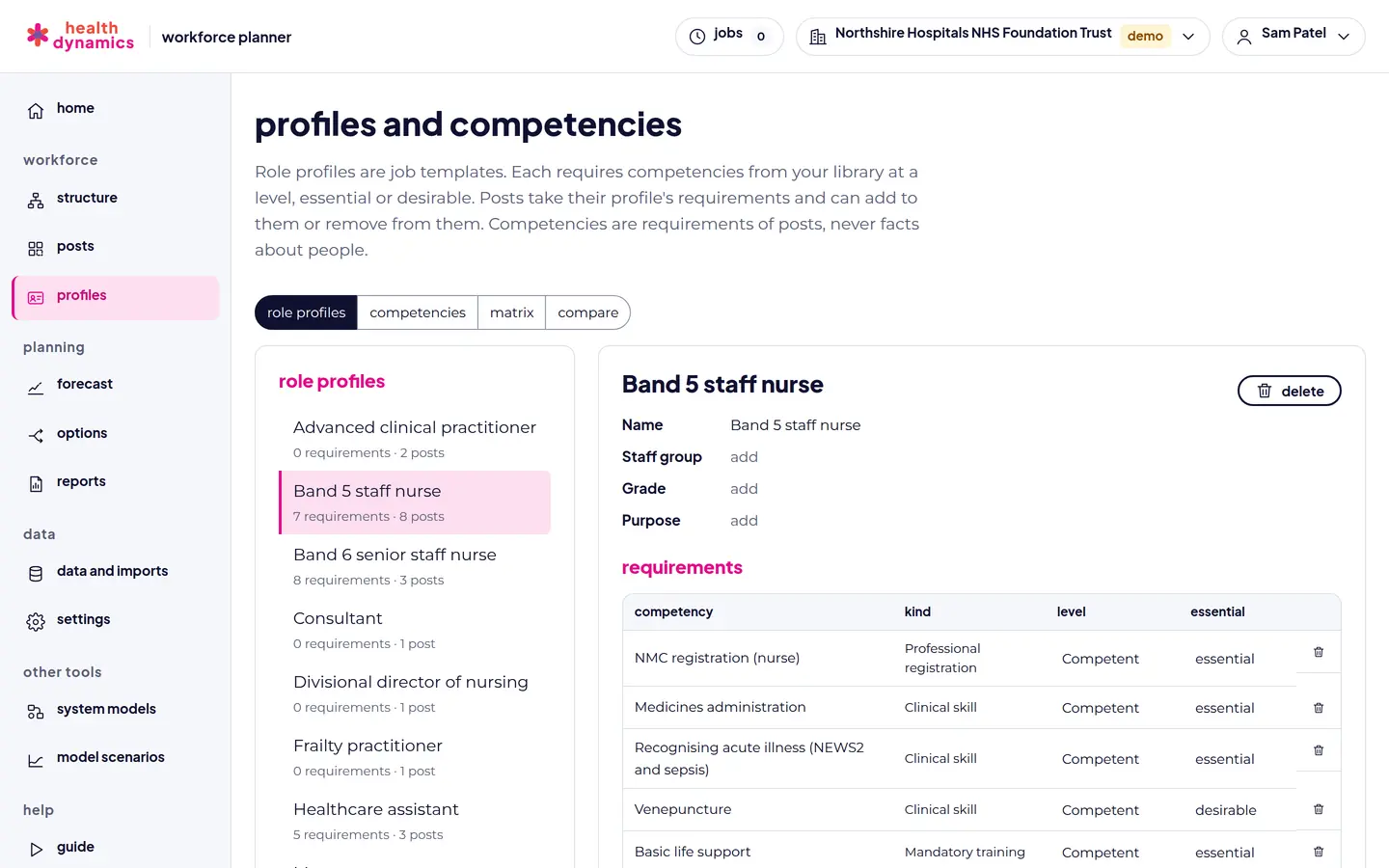
  • Role profiles with requirements at a level, essential or desirable
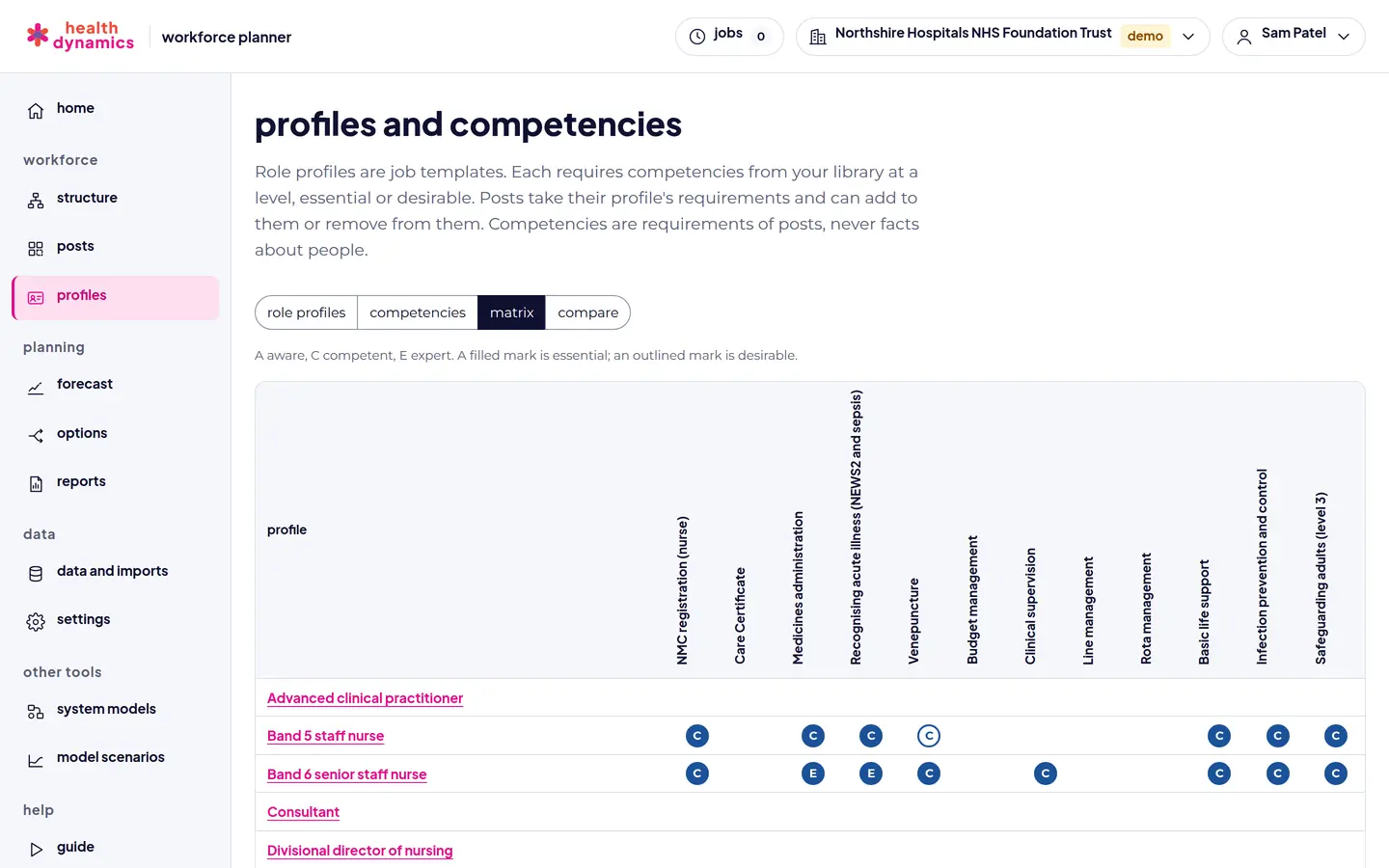
  • Which posts need a skill, and which posts need much the same
  • Compare two posts or profiles: what is shared and what would need to be learned

forecasts

  • Every post projected month by month for 1 to 30 years, for a ward, a directorate, or the whole organisation
  • Leaving, retirement by age band, internal moves, career pathways, and recruitment
  • Assumptions for any group of posts, worked out from your recorded history with a back-test
  • The structure and gap in any month, and changes over time from your recorded history

options

  • New posts, closures, regrades, moves, and funding and state changes, each from a month
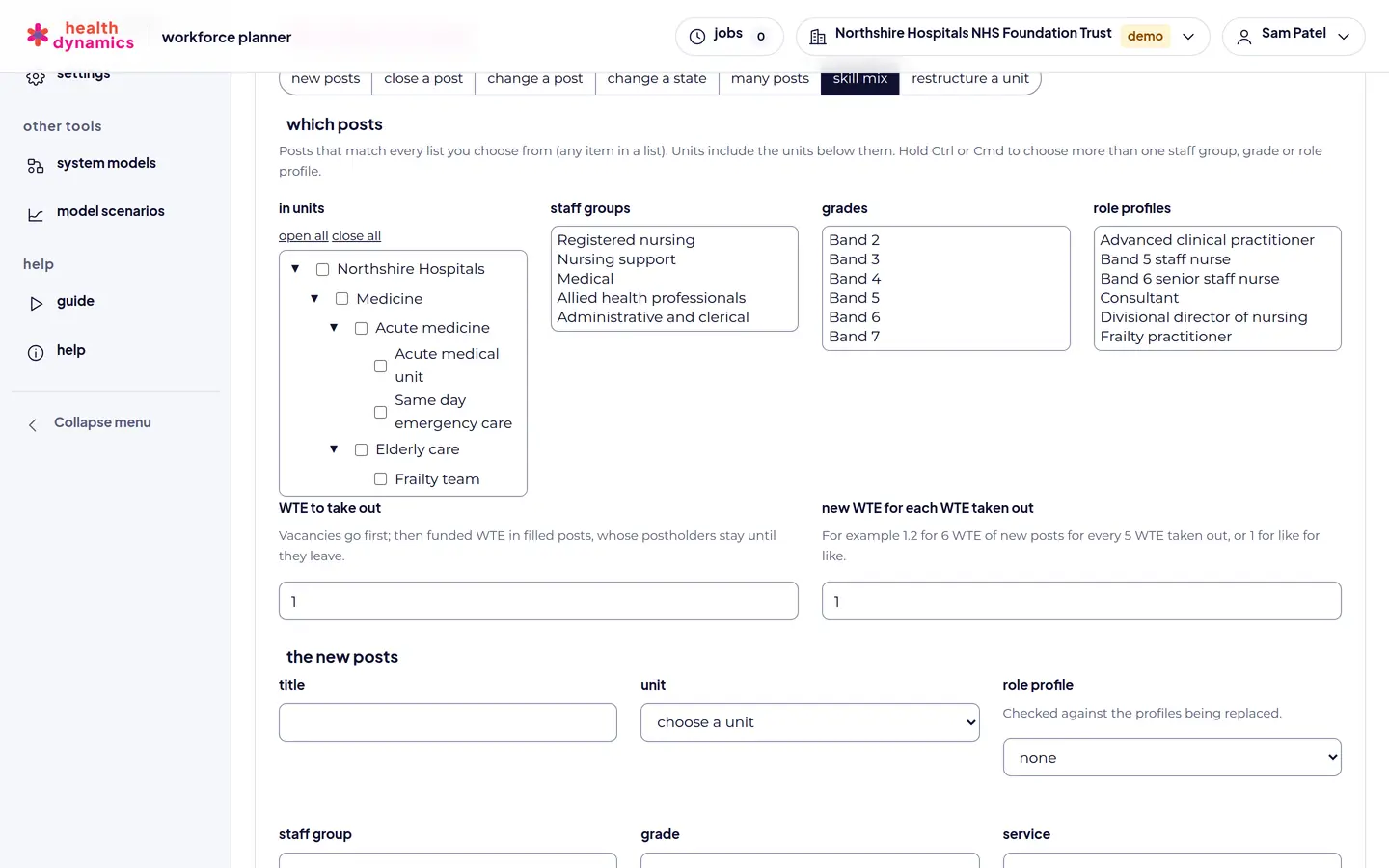
  • Changes to many posts at once by rule, and skill mix changes with a competency check
  • Restructures of units: rename, move, merge, or close from a month
  • Compared side by side, then adopted into your plan, and undone if needed

staffing need and pay

  • Staffing standards by care hours per patient day, staff on each shift, or a set WTE
  • Skill mix by staff group and grade, set against funded WTE and staff in post
  • Pay from a rate card: pay points, enhancements, protection, on-costs, and uplifts
  • A drafted option to close the gap to need

service impact

  • Staffed beds, and the share of pay on bank and agency cover
  • Capacity, demand, waiting lists, and waits for a service
  • Linked system models run for each option
  • Not performance management: nothing is measured against a person or a team

layers on top

  • Policies: retention, retirement, recruitment, supply, and training places from a month
  • Staff needed by service from a population demand forecast
  • Sensitivity analysis: one at a time, on a grid, and at random
  • System dynamics models driven by a forecast, month by month

reports and exports

  • A board pack built on posts, with a sentence for each option
  • Reports from any part of a forecast, as PDF or CSV
  • Option changes and assumptions as spreadsheets, out and back in
  • The whole forecast exported, and saved views to come back to

AI assistant (paid add-on)

  • Drafts forecasts, assumptions, options, staffing standards, and service impact settings from a request in plain words
  • Answers questions about a forecast and its options from their figures
  • Every draft checked and explained, for a person to choose from: nothing is applied for you
  • Not in the demo. Switched on for each organisation with a paid licence

What the demo includes. The demo has the capabilities of the full platform, so you can load your own posts and try every step, but it is limited to 50 posts and the AI assistant is switched off. A paid licence is priced for the number of posts you need, and adds the AI assistant, a service level agreement, analytics support, and a warranty.

screen by screen

your posts and structure

Every screen below is in the free demo. The figures are from a fictional NHS trust.

The structure drawn by line management, with each post as a card under the post it reports to
The structure by line management.
The structure as a table of units, with posts, funded and contracted WTE, filled, vacant, proposed, and frozen posts
The same structure as a table, with totals at every level.
A post card showing a job-share staff nurse post: unit, reporting line, grade, staff group, role profile, funding, and dated history
A post: its place, funding, state, and history.
The posts table, filtered by unit, state, funding, and staff group, with funded and contracted WTE
Every post in a table, filtered and edited in place.
screen by screen

profiles, competencies, and your data

A Band 5 staff nurse role profile with its competency requirements, levels, and whether each is essential
A role profile and the competencies it requires.
A competency matrix showing which role profiles require each competency, at what level
The competency matrix across role profiles.
Importing posts and structure from an ESR position extract, a finance establishment file, or a spreadsheet
Load posts from ESR, a finance file, or your own spreadsheet.
screen by screen

forecasts

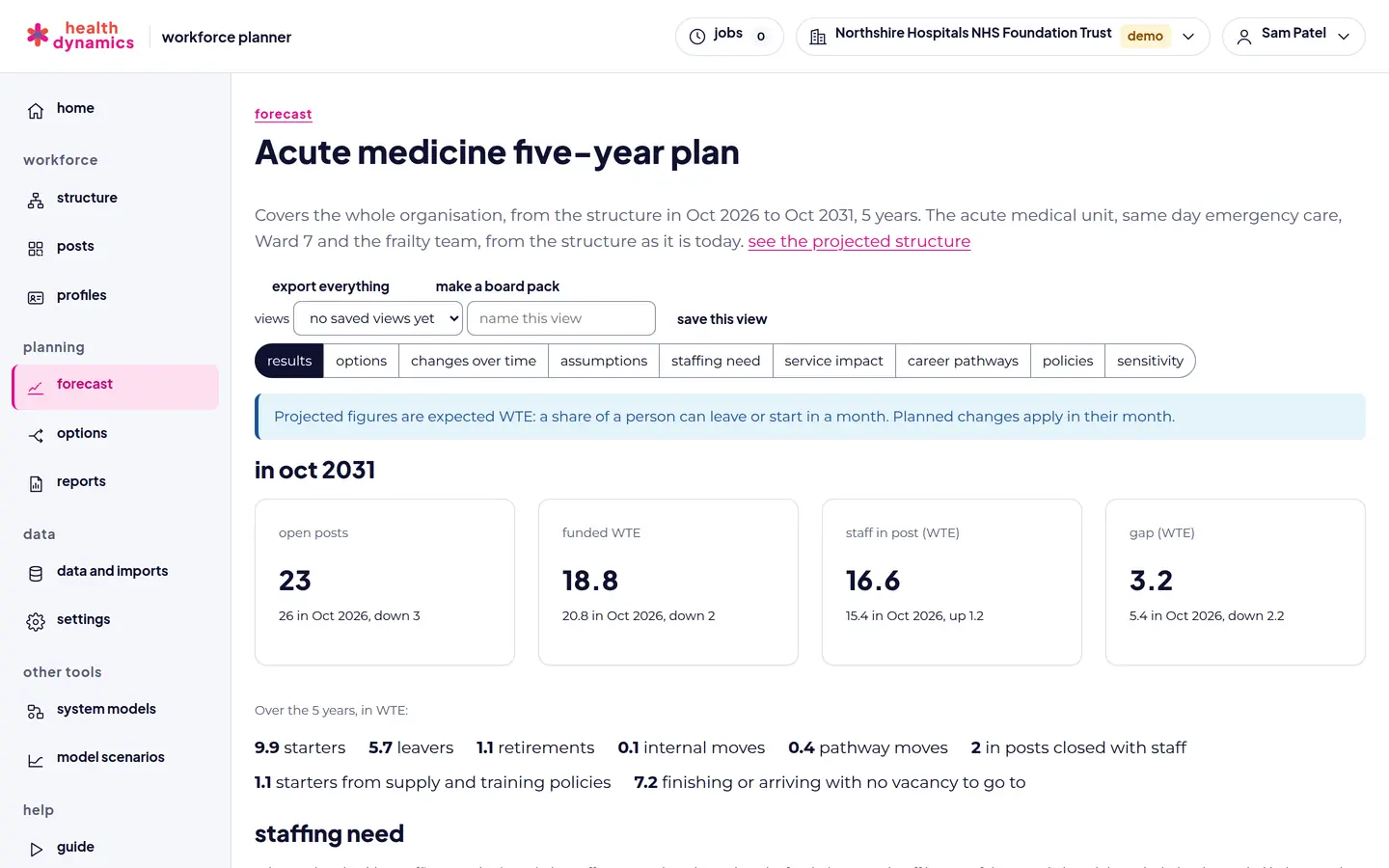
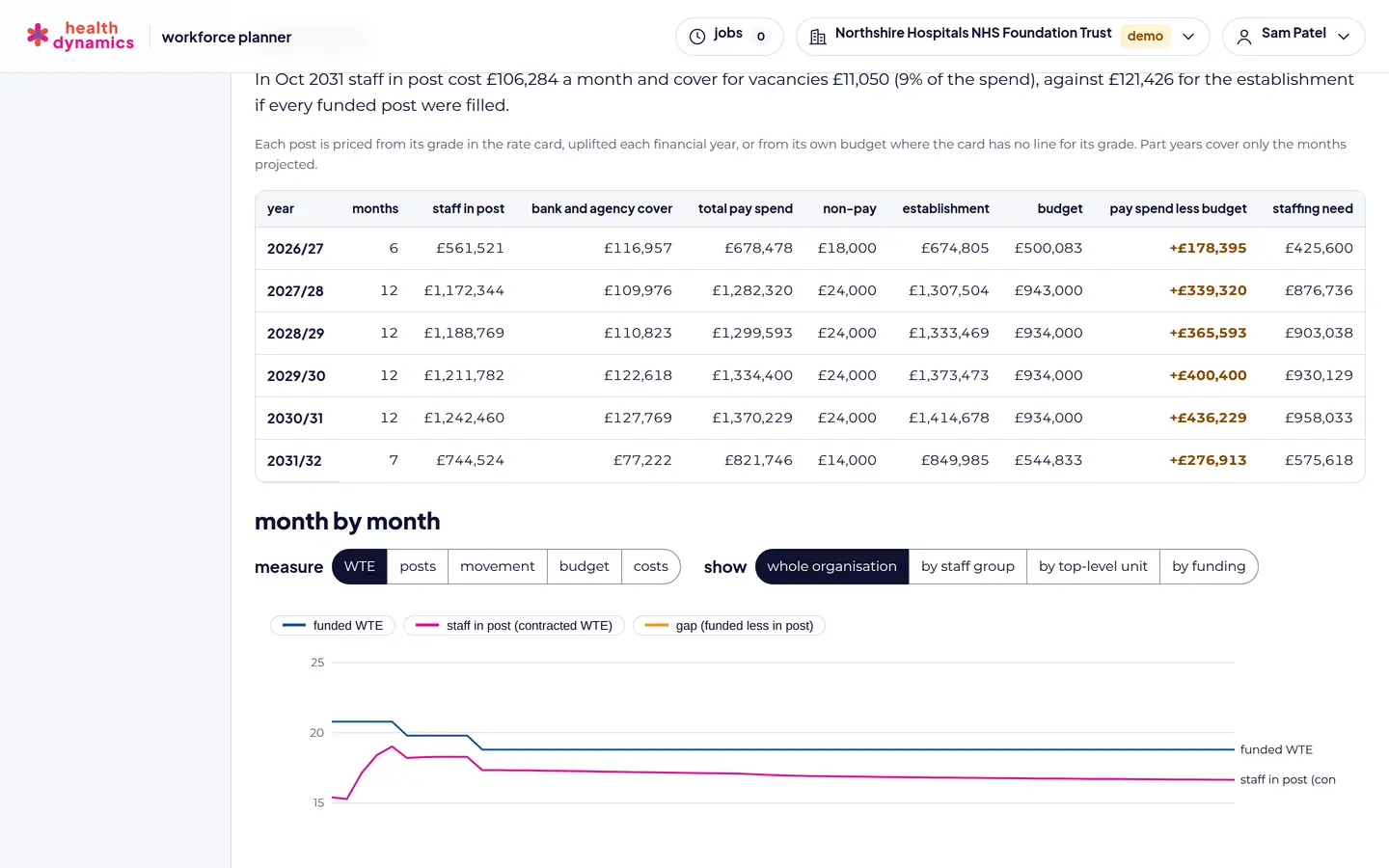
Forecast results: open posts, funded WTE, staff in post, and gap five years ahead, with starters, leavers, retirements, and internal moves
Results five years ahead, with the movement behind them.
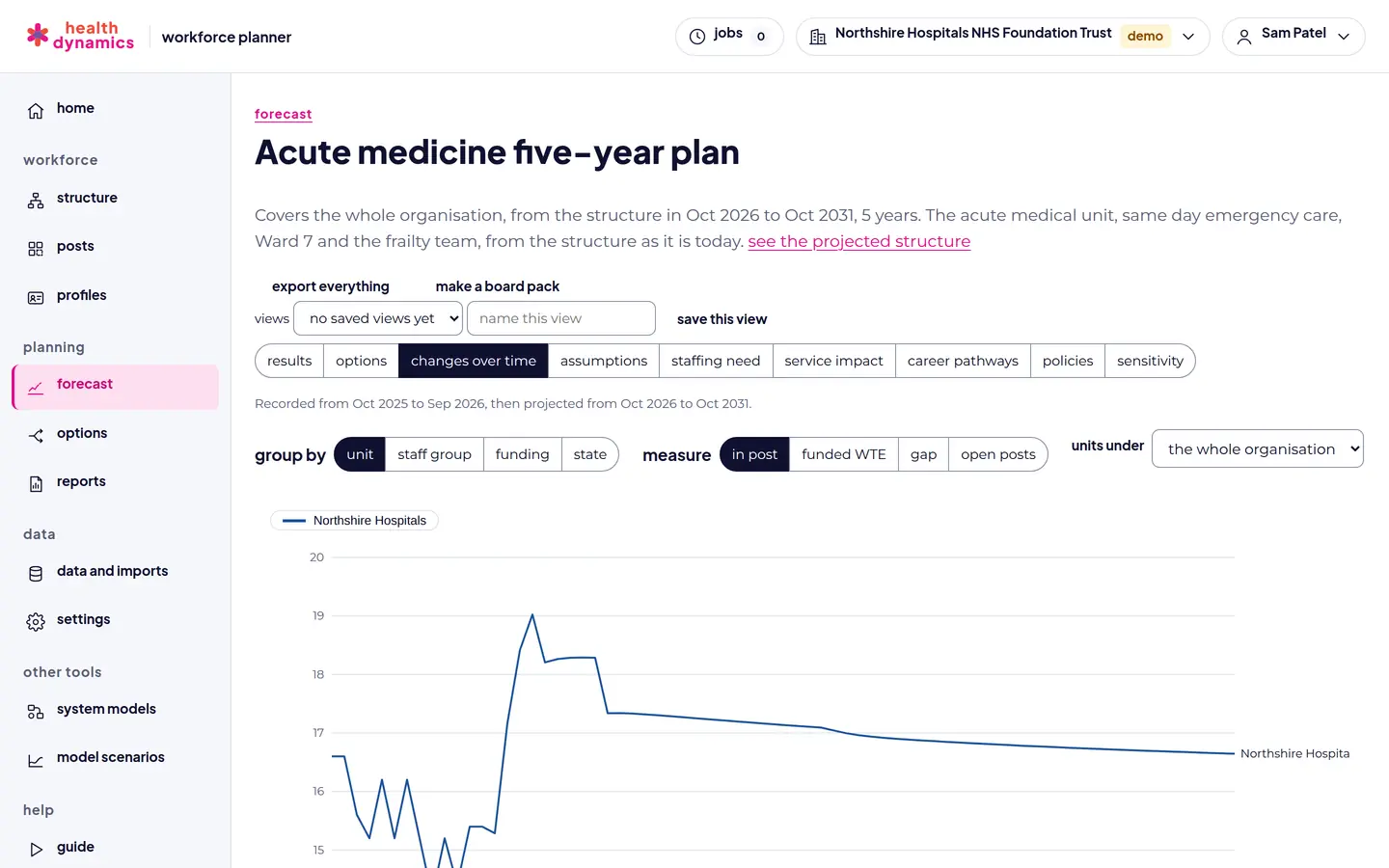
Changes over time chart showing staff in post by unit, recorded history followed by the projection
Changes over time: recorded history, then the projection.
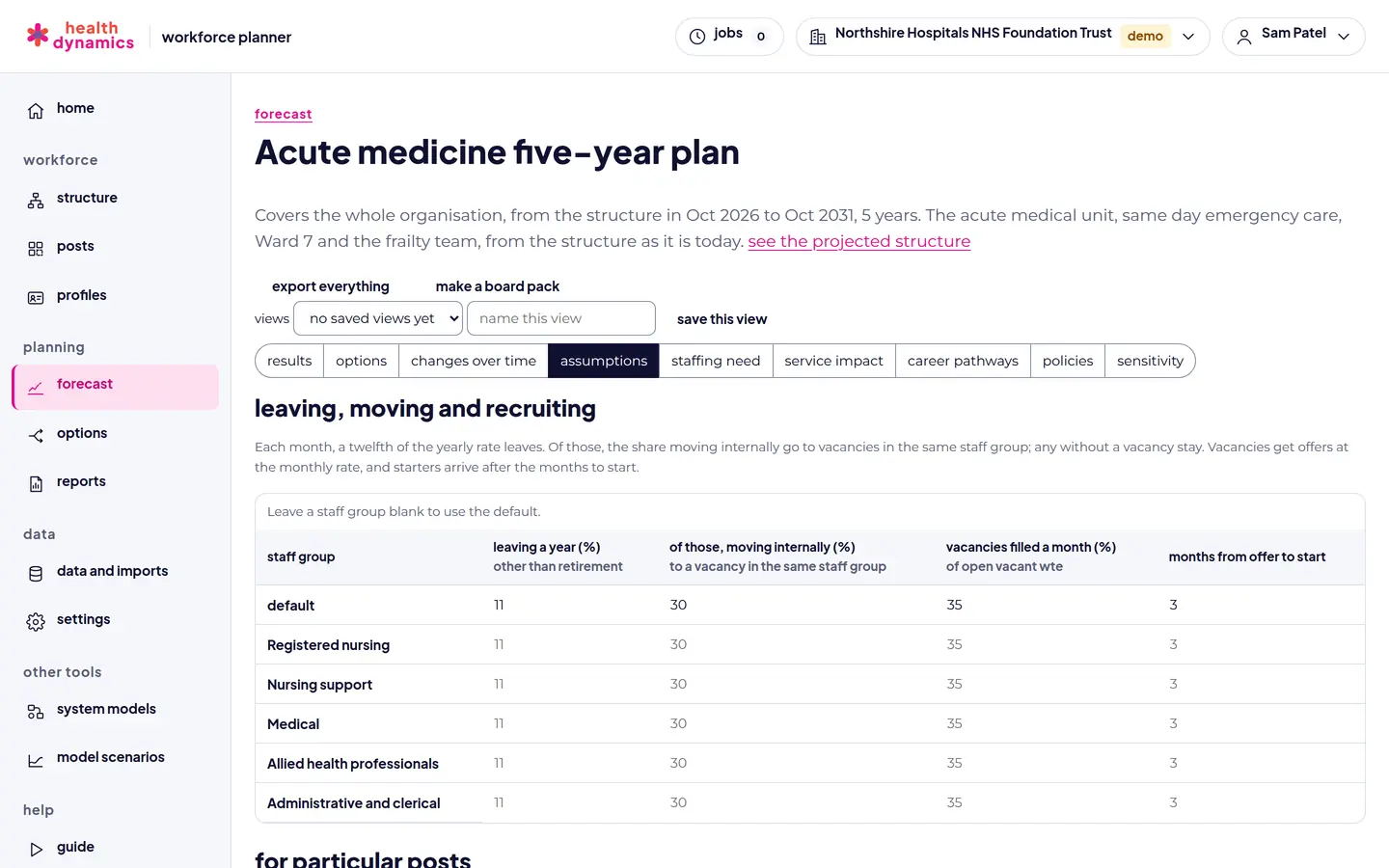
Forecast assumptions: leaving, internal moves, vacancies filled, and months from offer to start, by staff group, and retirement by age band
Assumptions by staff group, and retirement by age band.
Working out forecast assumptions from recorded history, with a back-test of todays assumptions
Rates worked out from your history, and back-tested.
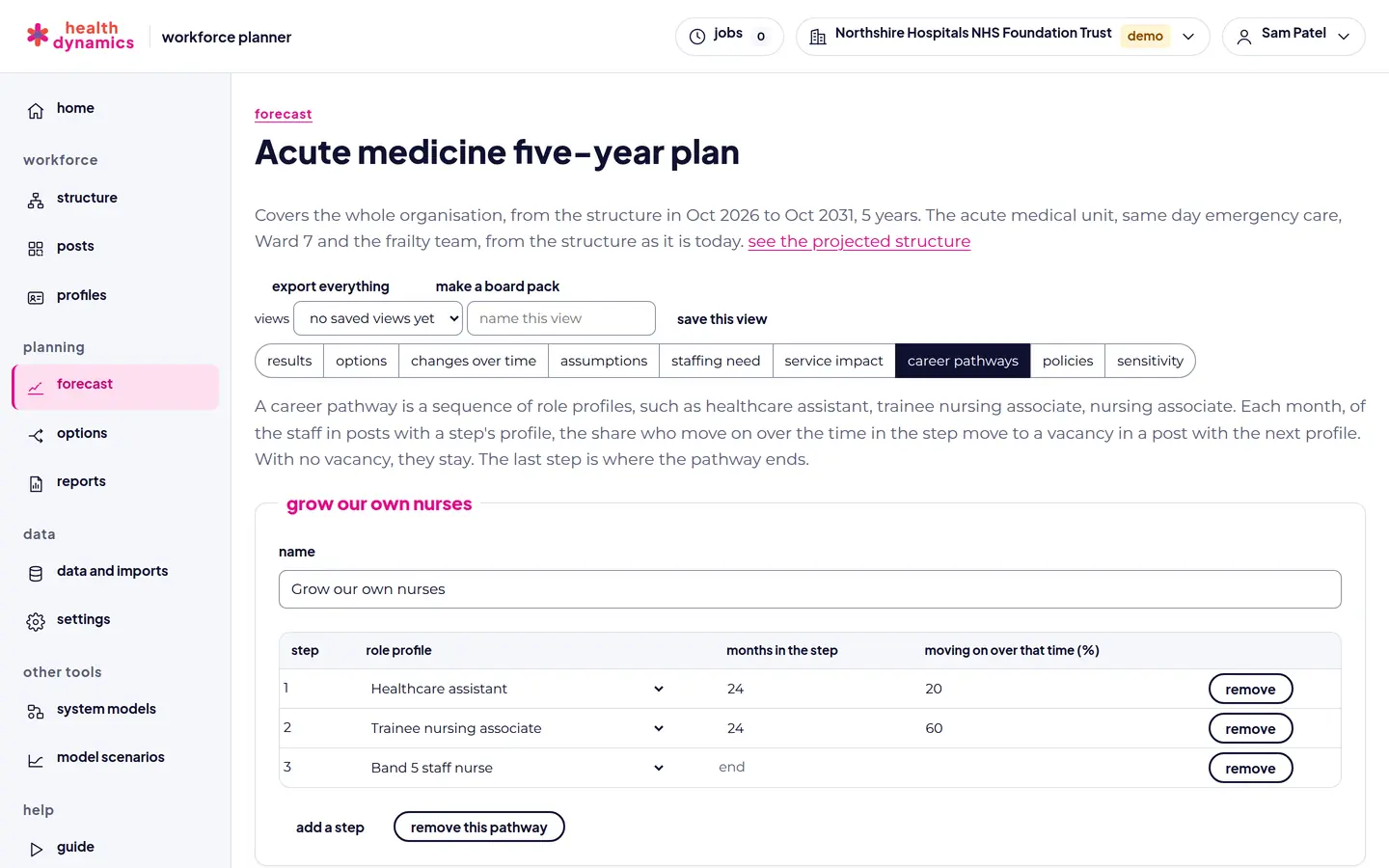
A career pathway from healthcare assistant to trainee nursing associate to Band 5 staff nurse, with months in each step and the share moving on
Career pathways: grow your own staff.
Workforce policies: a retention programme, international recruitment, and faster pre-employment checks, each from a month
Policies for retention, supply, recruitment, and training places.
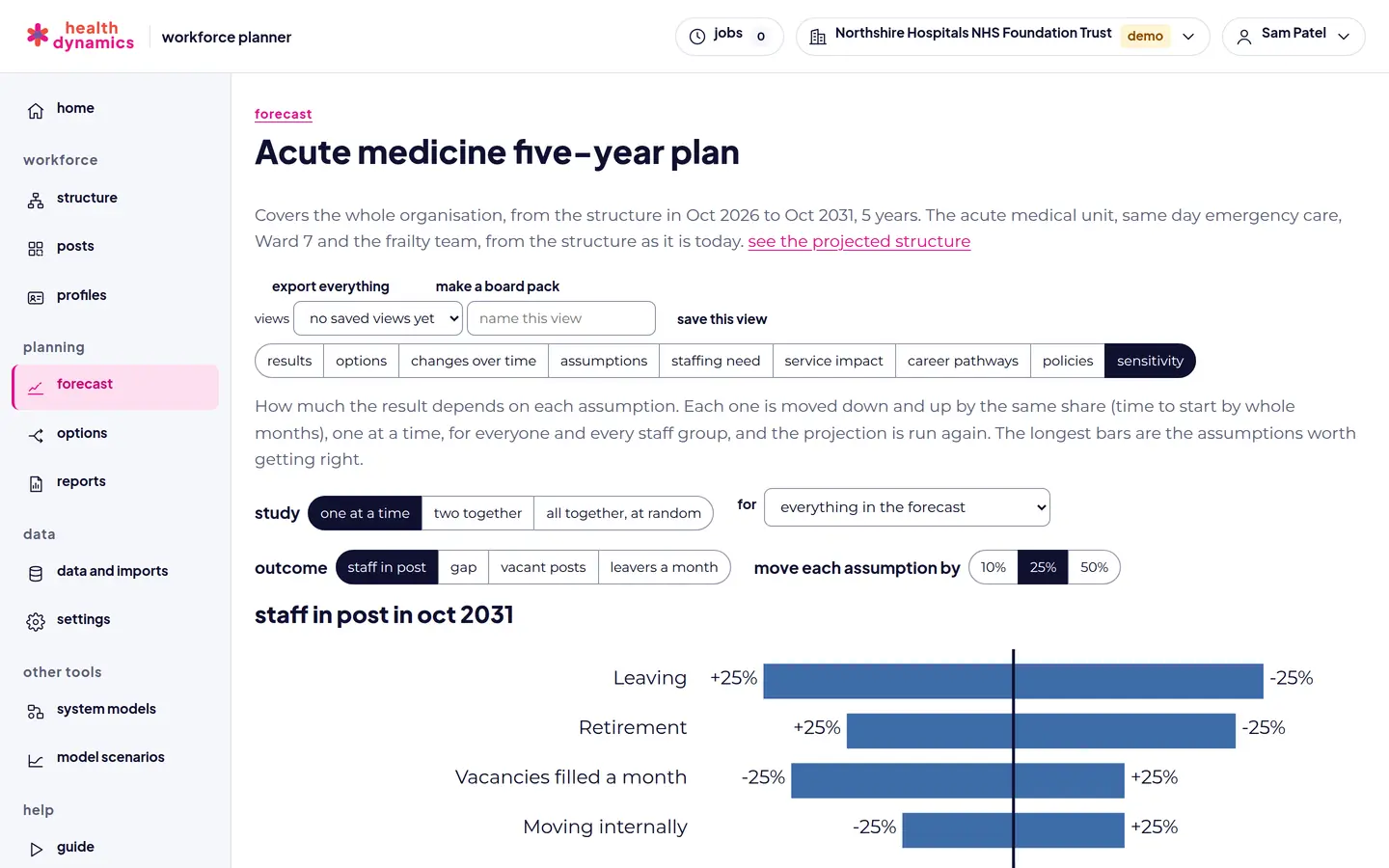
Sensitivity analysis: a tornado chart of which assumptions matter most to staff in post, and the range month by month
Sensitivity: which assumptions matter most.
The structure view as projected three years ahead by a forecast, with planned changes applied
The structure as the forecast projects it.
screen by screen

staffing need, pay, and service impact

Setting a staffing standard for a ward by beds, occupancy, care hours per patient day, headroom, and skill mix
Staffing standards by care hours per patient day, shifts, or a set WTE.
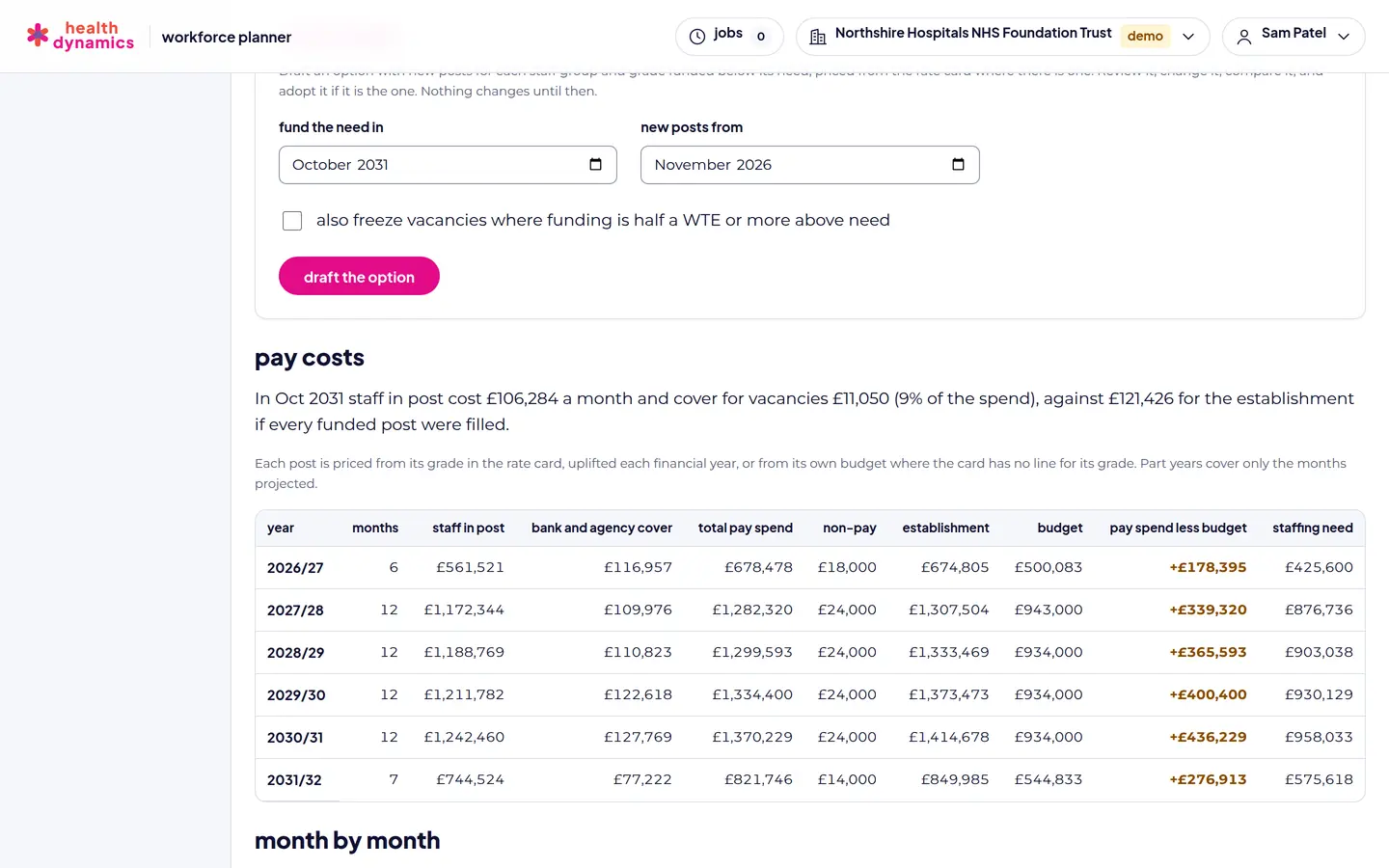
Drafting an option that funds the staffing need, by staff group and grade, priced from the rate card
One click drafts an option to close the gap to need.
Pay costs by financial year: staff in post, bank and agency cover, non-pay costs, establishment, and budget
Pay costs by financial year, with bank and agency cover.
Service impact: staffed beds, attendances and admissions the staff can do, demand, waiting, and waits, now and in five years
The likely effect on beds, capacity, and waits.
screen by screen

options and reports

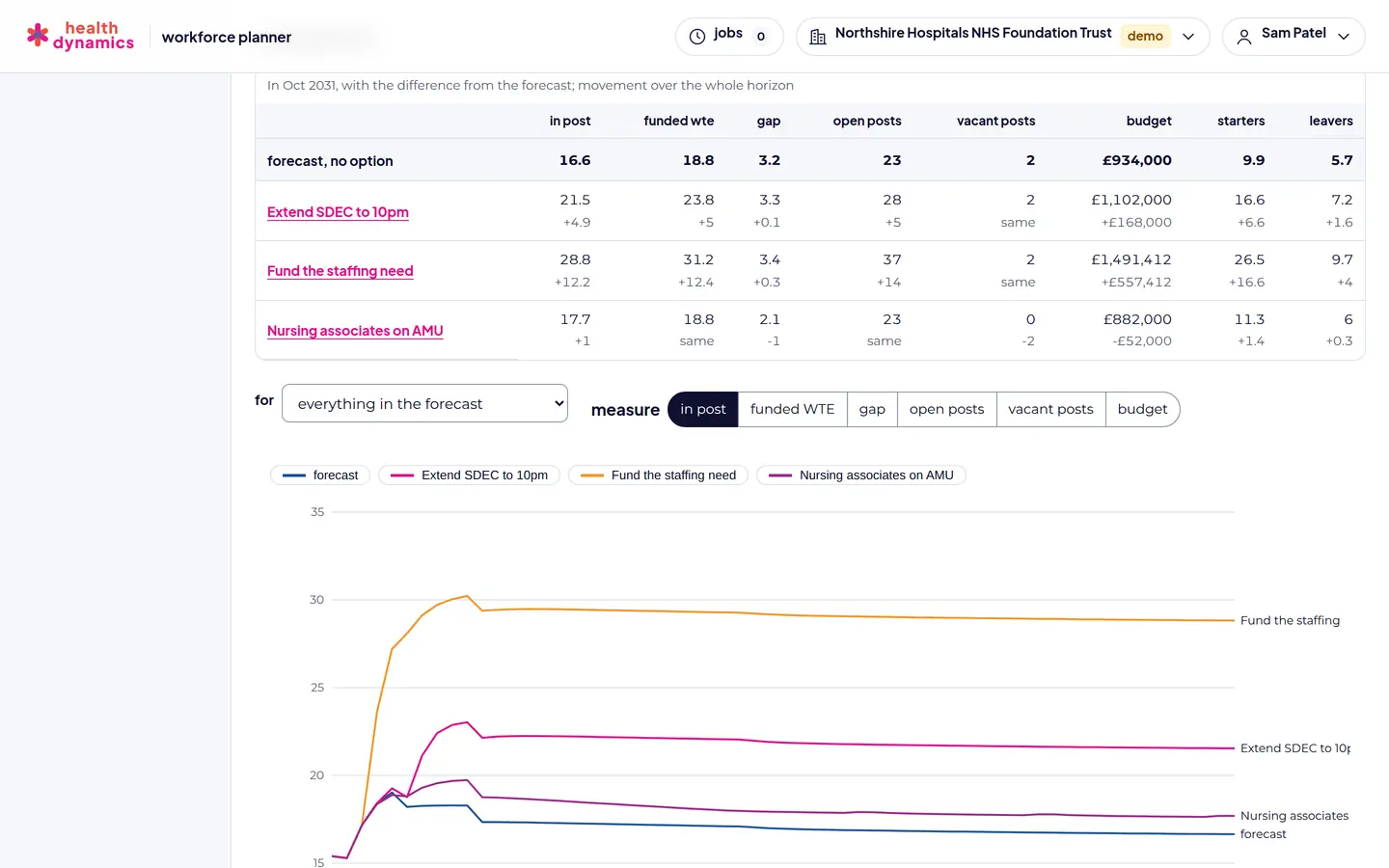
Options compared with the forecast on staff in post, funded WTE, gap, open and vacant posts, and budget, with a chart over time
Options compared side by side.
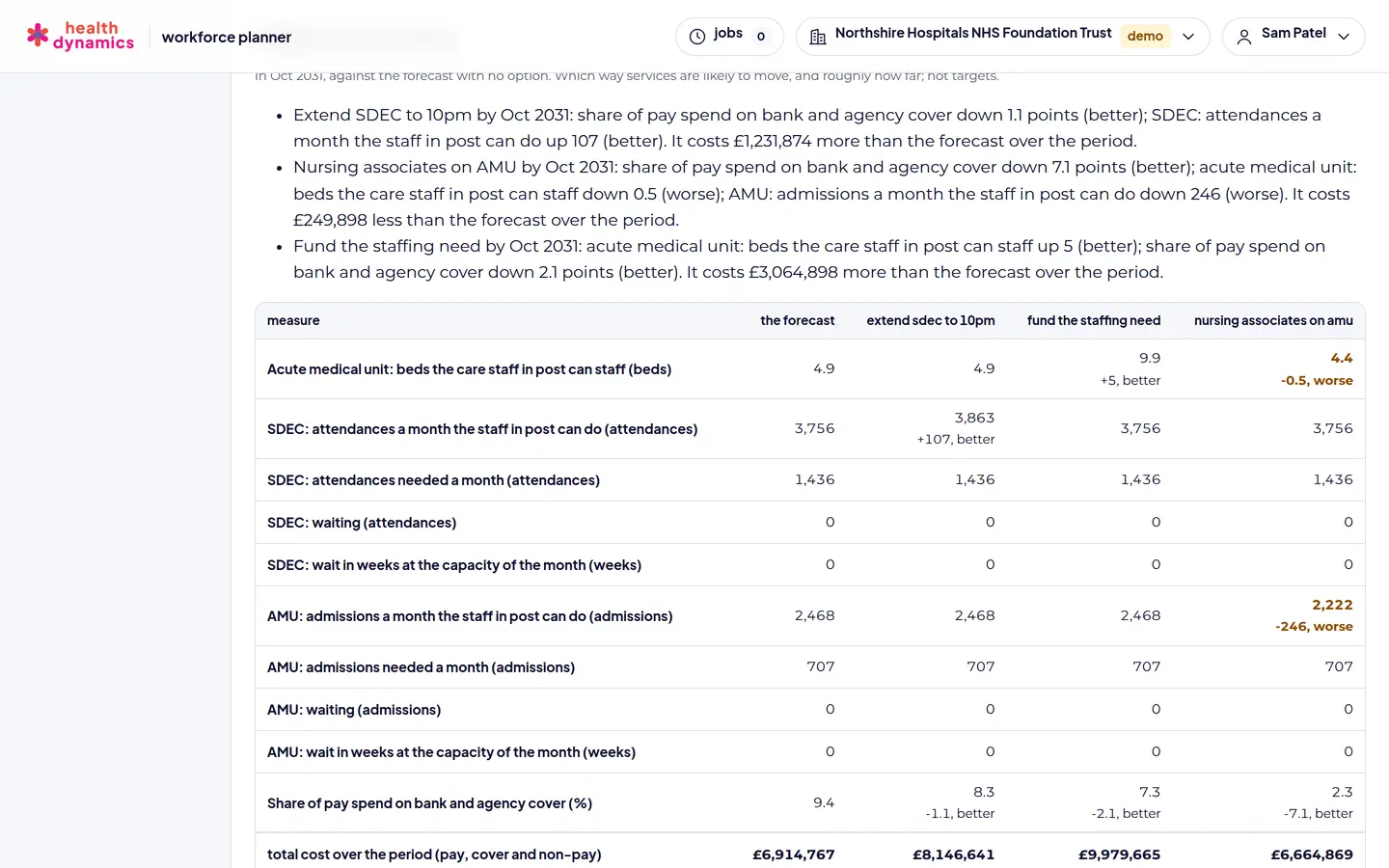
Each options effect on services and its total cost over the period, compared with the forecast
Each options effect on services, and its cost.
A skill-mix change in an option: WTE taken out of registered nursing and new nursing associate posts added
Skill-mix changes, with a competency check.
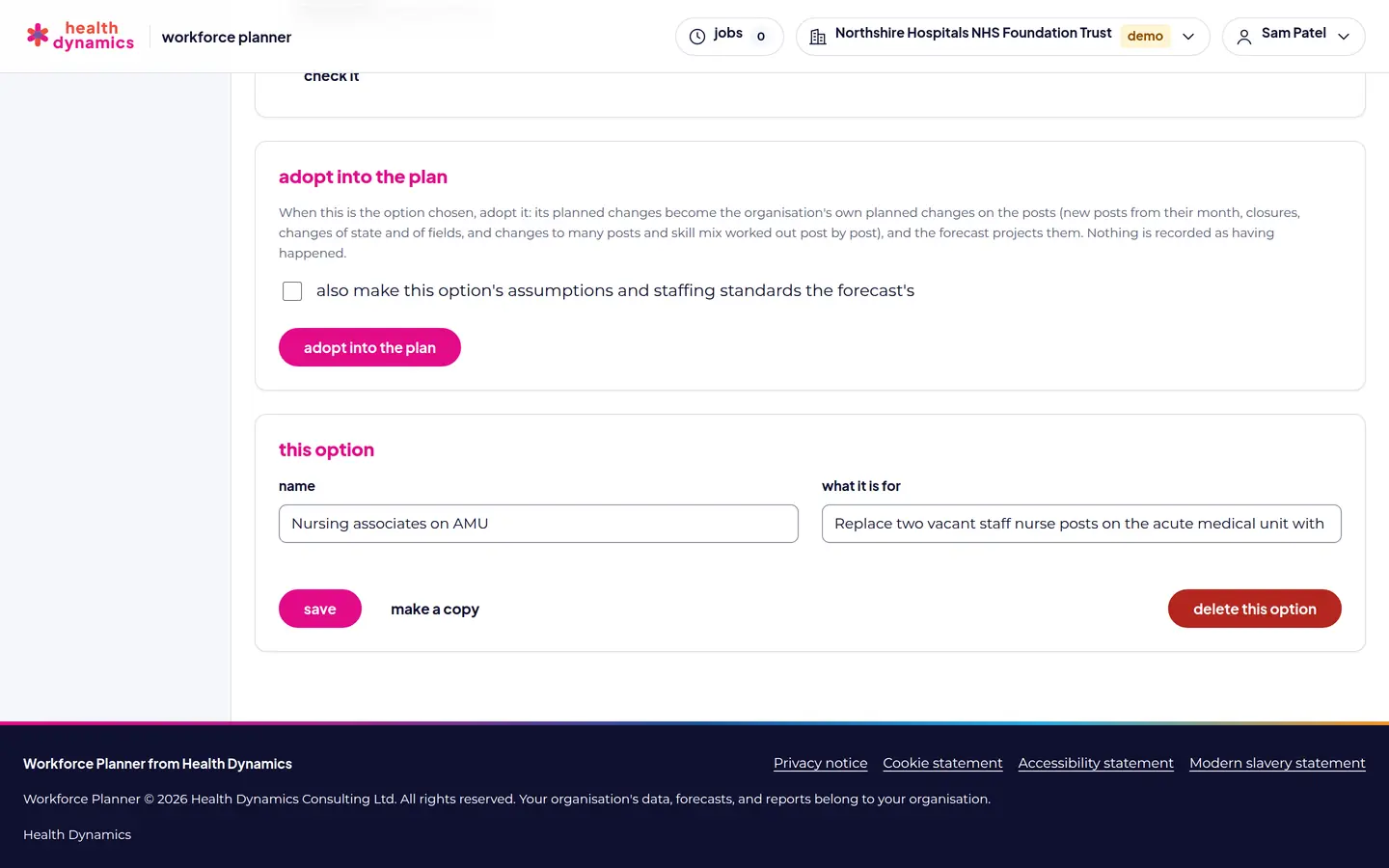
Adopting an option into the plan, with its planned changes becoming the organisations own
Adopt the chosen option into your plan.
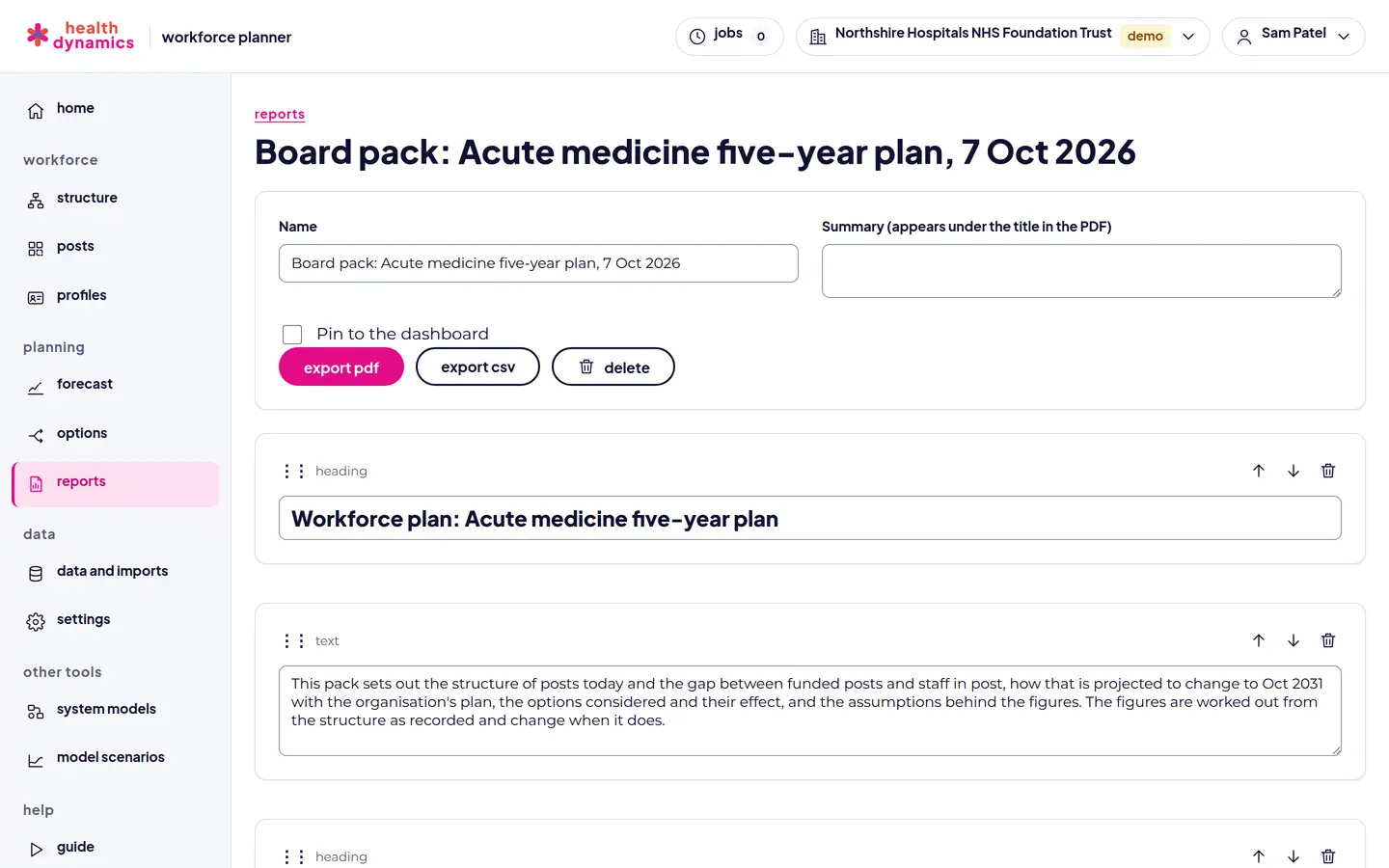
A board pack built from a forecast and its options, with headings and text, exported as PDF or CSV
A board pack, exported as PDF or CSV.

see your own structure, then plan it

Any organisation can try Workforce Planner free in the demo, with up to 50 posts: enough to load a ward or a small team, see its structure, forecast it, and test options. Send us a request and we will be in touch to set up your organisation.

request demo access book a 20-minute walkthrough see pricing and discounts